将 Zoom、Google Meet 和 Microsoft Teams 会议接入 Deepgram:bot 录制通话,Nova-3 使用你的模型和关键词进行转写,并通过 webhook 向你返回 Deepgram 原生 JSON 格式的结果。
Deeepgram 的 Nova-3 是目前速度最快、准确率最高的语音转文字模型之一——但 Deepgram 本身无法加入 Zoom 会议。如果你的 pipeline 已经基于 Deepgram 构建(自定义关键词、智能格式化、你协商好的费率),那么缺失的环节就是会议捕获。
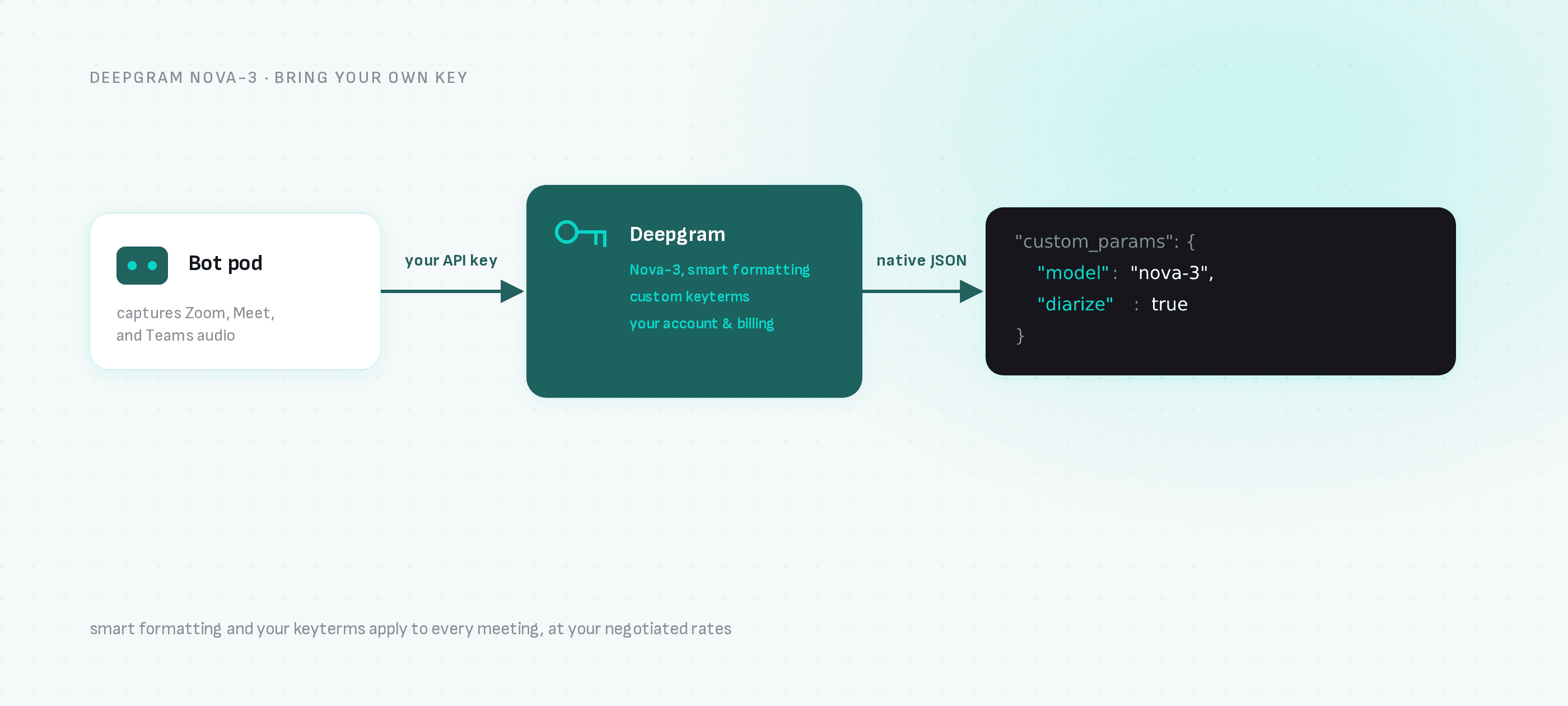
本指南将一个会议 bot 与你的 Deepgram 账户对接:bot 录制会议,Deepgram 进行转写,你的 webhook 接收 Deepgram 原生格式的输出。
只需一个 request:bot 加入 Zoom、Google Meet 或 Microsoft Teams,transcription_config 将音频路由到你的 API key 对应的 Deepgram 账户。
第一步:获取你的密钥
- Deepgram:在 Deepgram Console 中创建 API key(即你通常放在
DEEPGRAM_API_KEY中的那个 key)。 - Meeting BaaS:在 dashboard.meetingbaas.com 自助注册——前 8 小时录制免费。
第二步:发送已配置 Deepgram 的 bot
curl -X POST "https://api.meetingbaas.com/v2/bots" \
     -H "Content-Type: application/json" \
     -H "x-meeting-baas-api-key: $API_KEY" \
     -d '{
           "meeting_url": "https://meet.google.com/abc-defg-hij",
           "bot_name": "Deepgram Bot",
           "transcription_config": {
             "provider": "deepgram",
             "api_key": "'"$DEEPGRAM_API_KEY"'",
             "custom_params": {
               "model": "nova-3",
               "smart_format": true,
               "diarize": true
             }
           }
         }'
custom_params 将选项直接传递给 Deepgram,因此你已在使用的参数——model、smart_format、diarize、关键词提示——均可正常使用。如果不设置 model,Deepgram 默认使用 base,因此请明确指定 nova-3。
第三步:接收 Deepgram 原生输出
会议结束后,你的 webhook 将收到转写结果,其结构与 Deepgram 的 response 结构一致——包括 transcript、逐词时间戳、confidence 置信度分数、带智能格式化的 punctuated_word 值——以及 Meeting BaaS 标准格式的录像、参与者列表和发言时间线。你已为 Deepgram 编写的解析器可继续使用。
为什么选择这种组合
- 智能格式化:货币、电话号码和电子邮件通过 Deepgram 的
smart_format进行格式化 — 适用于销售电话提取。 - 关键词:在你的 Deepgram 账户中调整的产品名称和专业术语识别适用于每次会议。
- 你的计费:Deepgram 的使用量按照你自己的账户和费率计费;Meeting BaaS 在每个方案中,对于自带密钥转写,每录制小时收取 0.05 个 token,另加标准录制费率每小时 1 个 token。
何时使用内置选项
如果你没有 Deepgram 账号,内置的 Gladia 默认选项(每小时 0.25 个 token,支持 100 多种语言,含说话人分离)无需任何服务商配置。你可以为每个 bot 单独切换服务商,因此在同一产品中混合使用两者完全没问题。
下一步
- Deepgram 会议转写 — 集成页面
- 所有转写服务商 — Gladia、AssemblyAI、Speechmatics、Soniox
- 实时流式转写 — 通话中实时转写,而非通话后处理
- API 文档