The open-source Meeting BaaS MCP server lets Claude, Cursor and any MCP client send recording bots, search transcripts, schedule calendar recordings and share meeting moments — from chat.
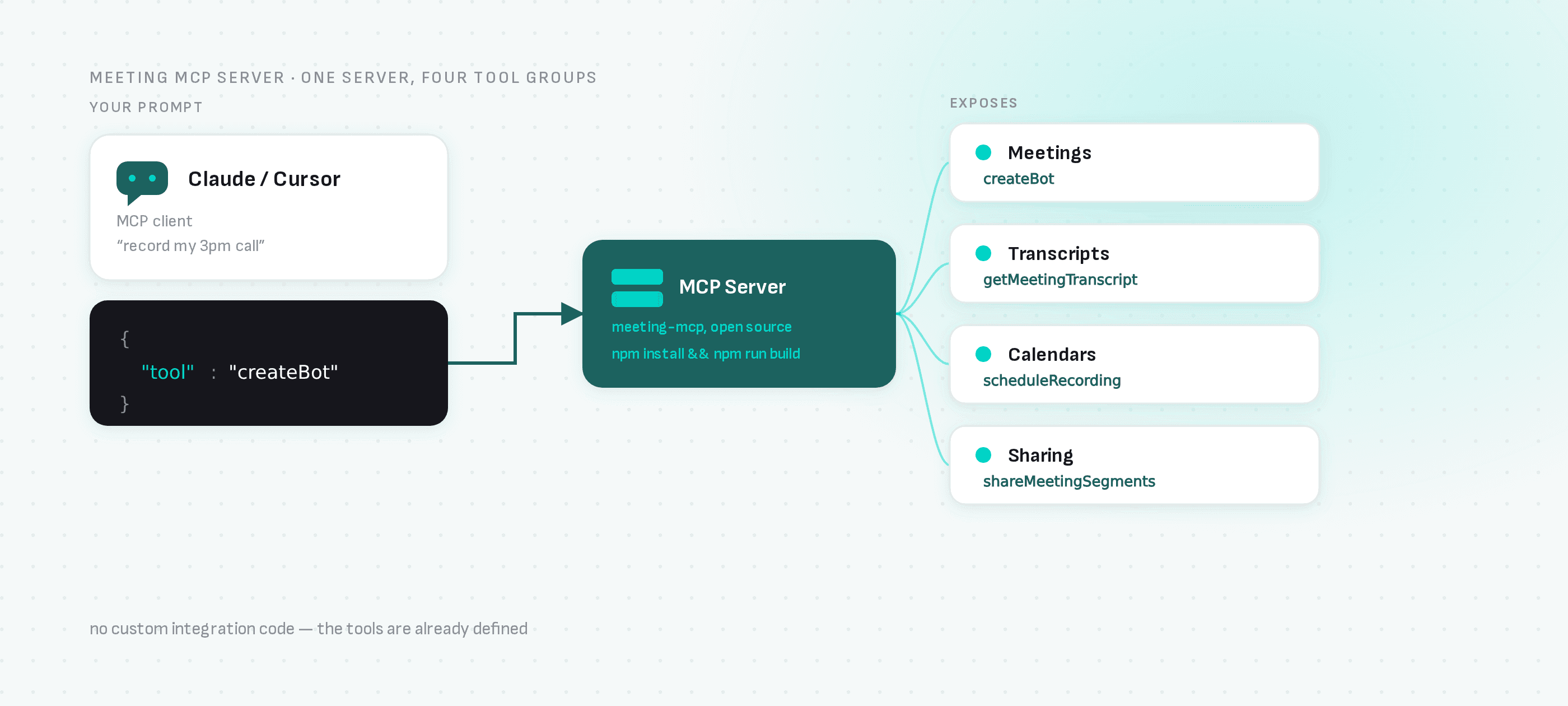
The Model Context Protocol turned AI assistants into API clients: give Claude or Cursor an MCP server and they can call real tools instead of just talking about them. Meeting BaaS ships an open-source MCP server that exposes the whole meeting stack — so "record my 3pm call and pull the action items afterwards" becomes something your assistant can actually do.
MCP server + meeting bot API = an assistant that attends meetings for you. No custom integration code — the tools are already defined.
What the server exposes
The MCP server maps the Meeting BaaS API onto tools an assistant can call:
- Meetings:
createBotsends a recording bot to any Zoom, Google Meet or Microsoft Teams URL;getMeetingDataandgetRecordingStatustrack it - Transcripts:
getMeetingTranscriptfetches the speaker-attributed transcript;findKeyMomentslocates the segments worth replaying - Calendars:
setupCalendarOAuth,listUpcomingMeetings,scheduleRecordingandcancelRecordingautomate recording from the calendar instead of per-meeting URLs - Sharing:
shareableMeetingLinkandshareMeetingSegmentsproduce links to full recordings or specific moments
That's the practical difference between a chatbot that knows about your meetings and an agent that operates them.
Setup for Claude Desktop
Clone the repo, run npm install && npm run build, then register the server in claude_desktop_config.json with your API key (self-serve at dashboard.meetingbaas.com, first 8 recording hours free). Claude Desktop launches this server as a local process, not over HTTP, so the key goes in env, not headers — a headers block here is silently ignored and auth fails. The example below is macOS/Linux; on Windows, swap the command/args for your shell of choice (e.g. cmd /c or PowerShell):
{
  "mcpServers": {
    "meetingbaas": {
      "command": "/bin/bash",
      "args": [
        "-c",
        "cd /path/to/meeting-mcp && (npm run build 1>&2) && export MCP_FROM_CLAUDE=true && node dist/index.js"
      ],
      "env": {
        "MEETING_BAAS_API_KEY": "YOUR_API_KEY"
      }
    }
  }
}
Cursor and other MCP clients use the same server with their own registration syntax.
What you can build on top
- Meeting-aware coding agents: Cursor pulls the transcript of the architecture call before writing the migration it discussed
- Chat-driven recording: "send a bot to this meeting link" from any MCP client — no dashboard visit
- Post-meeting workflows: assistants that fetch transcripts, extract decisions and file the follow-ups, using
findKeyMomentsto cite the exact timestamps - Speaking agents: pair with the speaking-bots-mcp server and the assistant doesn't just read meetings — it attends and talks
Under the hood
Every MCP tool calls the same meeting bot API available directly: 1 token per recorded hour with speaker diarization included, transcription from six providers, real-time streaming when the agent needs live data.
Next steps
- meeting-mcp on GitHub — the server source
- MCP tools project page — overview of the MCP ecosystem around Meeting BaaS
- API documentation — the underlying API