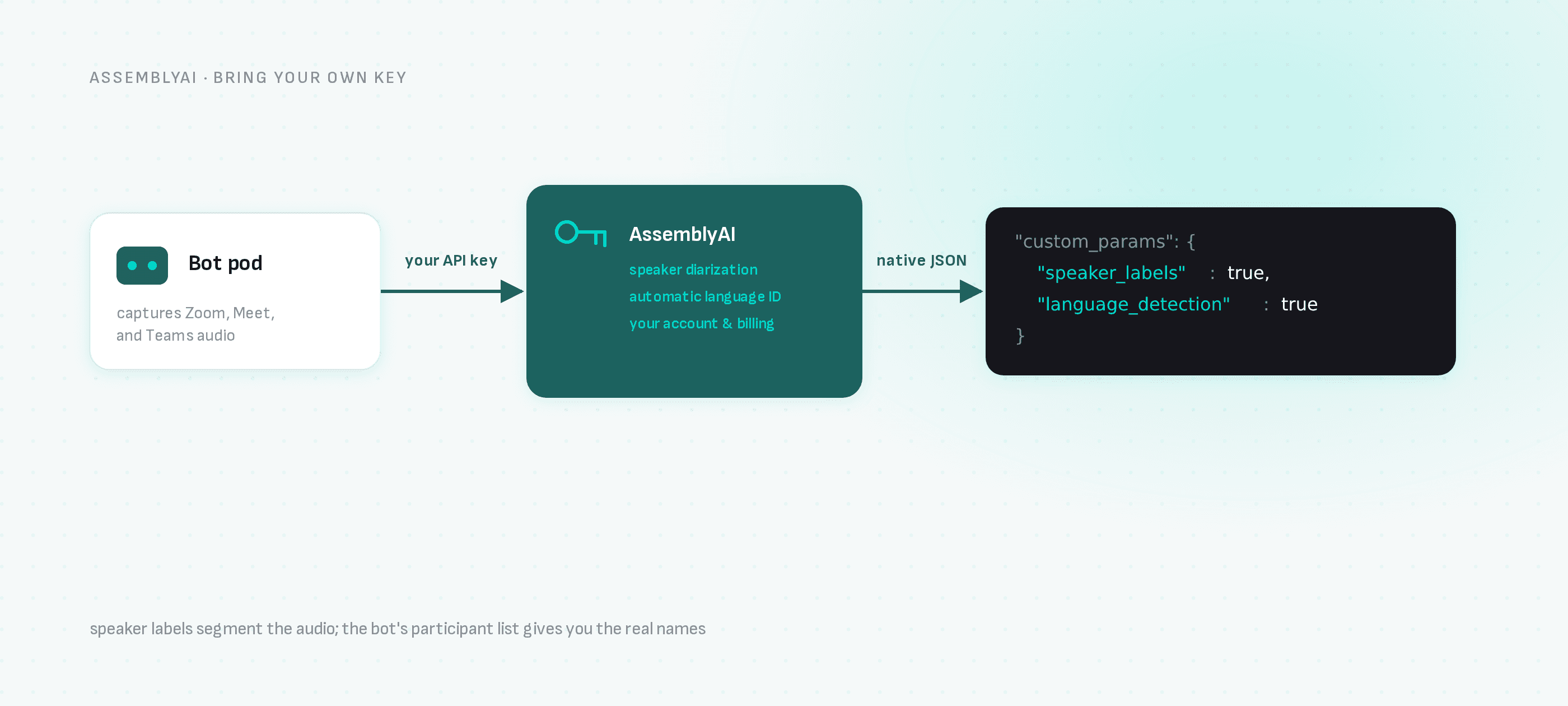
Feed Zoom, Google Meet and Microsoft Teams meetings into AssemblyAI: a bot captures the call, AssemblyAI transcribes with speaker labels and language detection, and you get AssemblyAI-native JSON by webhook.
AssemblyAI is a favorite for teams that want more than raw text — speaker labels, language detection and audio intelligence on top of transcription. What AssemblyAI doesn't do is attend meetings. Its API starts from an audio_url; someone still has to produce that audio.
That's the part a meeting bot solves. This guide connects the two: a bot records the meeting, AssemblyAI processes it under your account, and your webhook receives AssemblyAI-native output.
Your AssemblyAI pipeline stays exactly as it is — the bot just becomes its audio source for Zoom, Google Meet and Microsoft Teams.
Step 1: Get your keys
- AssemblyAI: grab your API key from the AssemblyAI dashboard (the
ASSEMBLYAI_API_KEYyou already use). - Meeting BaaS: self-serve signup at dashboard.meetingbaas.com — first 8 recording hours free.
Step 2: Send a bot with AssemblyAI configured
curl -X POST "https://api.meetingbaas.com/v2/bots" \
     -H "Content-Type: application/json" \
     -H "x-meeting-baas-api-key: $API_KEY" \
     -d '{
           "meeting_url": "https://us02web.zoom.us/j/1234567890",
           "bot_name": "AssemblyAI Bot",
           "transcription_config": {
             "provider": "assemblyai",
             "api_key": "'"$ASSEMBLYAI_API_KEY"'",
             "custom_params": {
               "speaker_labels": true,
               "language_detection": true
             }
           }
         }'
custom_params forwards options to AssemblyAI unchanged: speaker_labels splits the transcript by speaker, language_detection picks up the dominant language automatically, and the rest of AssemblyAI's request surface passes through the same way.
Step 3: Receive AssemblyAI-native output
Your webhook receives the transcription artifact mirroring AssemblyAI's response structure — utterances with speaker labels, word-level timestamps, detected language — alongside the recording, participant list and speaker timeline in the standard Meeting BaaS format. Two speaker systems, one advantage: AssemblyAI's speaker_labels segment the audio, while the bot's participant metadata gives you the actual names behind the voices, so you can join the two.
Why this combination
- Meeting-aware context: AssemblyAI hears clean meeting audio captured at the source, not a laptop-microphone re-recording.
- Your models and billing: usage runs on your AssemblyAI account; Meeting BaaS adds 0.05 tokens per recorded hour for bring-your-own-key transcription on every plan, plus the standard 1 token per hour recording rate.
- Per-bot choice: switch providers per request — run AssemblyAI for English sales calls and the built-in Gladia default (100+ languages) for everything else.
Next steps
- AssemblyAI meeting transcription — the integration page
- All transcription providers
- How the meeting bot works
- API documentation