Learn about our new approach to meeting recordings, designed to improve quality and reliability and bring more consistency to recordings across supported platforms.
We're introducing a new meeting recording pipeline for Meeting BaaS bots, now available in beta.
The new pipeline is designed to improve recording quality and reliability while providing a more consistent recording experience across supported meeting platforms. It also lays the foundation for future improvements to how meetings are recorded.
The first available recording view is Spotlight, which focuses on the active speaker without including meeting controls or browser elements.
Beta Notice
This recording pipeline is still under active development, and you may encounter issues as we continue to improve its stability and reliability. We recommend testing it with internal meetings or a limited number of bots before adopting it in production. We don't recommend switching all your production recording traffic to the beta pipeline yet.
1. What's new?
The new recording pipeline introduces Spotlight, a recording view that focuses on the active speaker without including meeting controls or browser elements.
Spotlight is the only recording view available in the beta for now.
The new pipeline is designed to provide several improvements:
- Improved recording quality: A clearer, more consistent recording experience.
- More reliable audio and video: Designed to reduce issues such as choppy audio and low-quality video.
- Consistent composition across platforms: A more predictable recording view across supported meeting platforms, rather than one that depends on each platform's meeting interface.
- Room for future improvements: A foundation for introducing additional recording views and capabilities over time.
For developers building on Meeting BaaS, this provides a foundation for improving recording reliability and expanding recording options over time.
2. Supported platforms
The beta recording pipeline currently supports the following platforms:
- Microsoft Teams — Supported
- Google Meet — Supported
- Zoom — Not supported by the new pipeline yet. Zoom continues to use the existing recording approach.
The beta pipeline applies to bots created using a beta API key on supported platforms. Zoom recordings continue to use the existing approach.
We'll share updates as support for additional platforms becomes available.
3. Why are we making this change?
Meeting recordings are an important part of many workflows built on Meeting BaaS. Customers rely on them to capture conversations accurately, making recording quality, audio continuity, and reliable behavior essential.
The existing recording approach has limitations that can affect the final output, including inconsistent video quality and occasional audio or video interruptions.
We're introducing the new pipeline to address these challenges and provide greater consistency across supported platforms. It also gives us a foundation for improving the recording experience and introducing additional options in the future.
4. Why is it in beta?
We have tested the new pipeline internally, but we can't test it as widely as our community can. We are releasing the API feature under the BETA label so customers can try it across real meetings and setups, and tell us what works and what doesn't before a broader release.
The BETA denotes that we expect to make iterative improvements, as we get feedback from customers.
We hope to learn from how you use it and the feedback you share with us. Your experience will help us improve meeting recordings as we work toward a broader release.
5. How can you try the beta?
Step 1: Create a beta API key
Open your Meeting BaaS dashboard and navigate to the API key section.
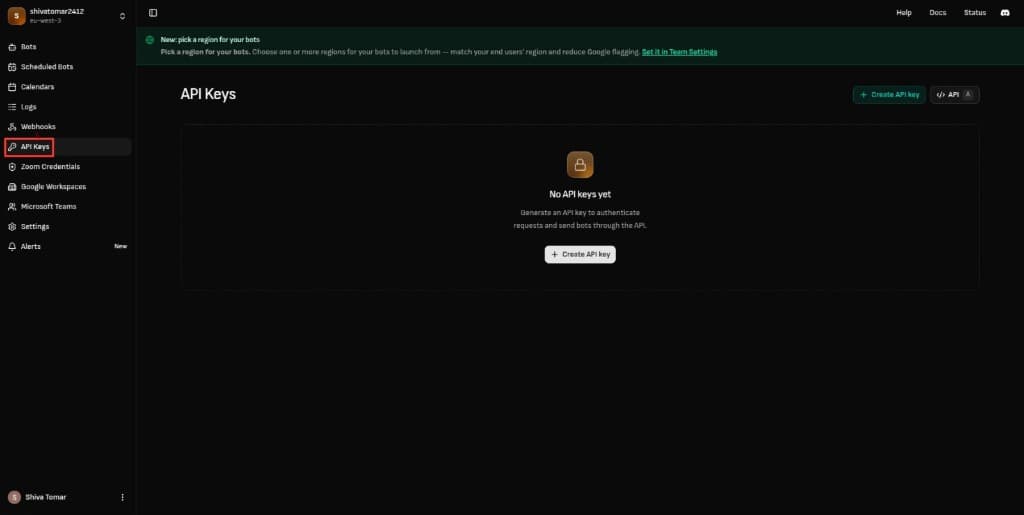
Create an API key for the beta recording pipeline.
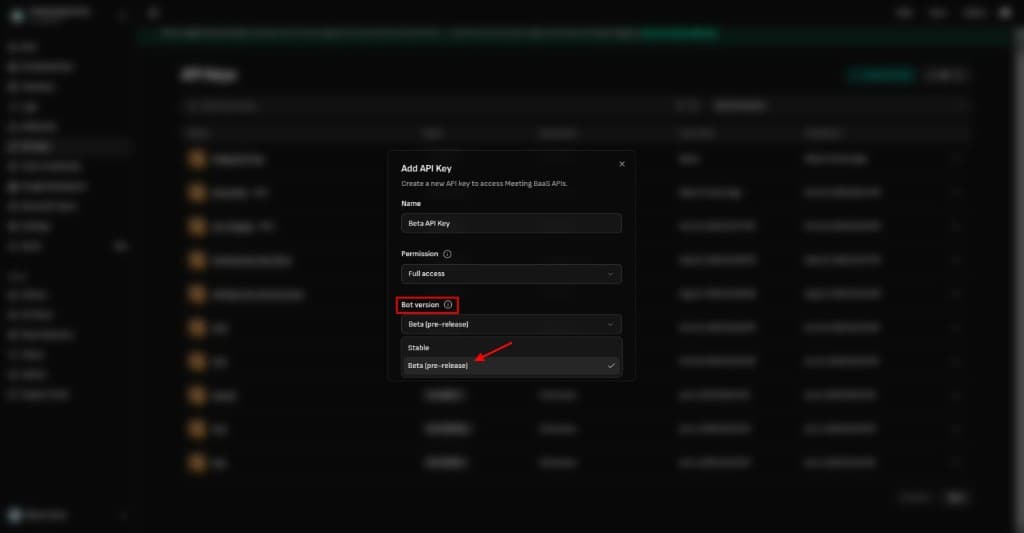
Step 2: Create a bot using the beta key
Use the beta API key with your existing API base URL and bot creation request. Invite the bot to a Microsoft Teams or Google Meet meeting as you normally would.
For example:
curl --location 'https://api.meetingbaas.com/v2/bots' \
  --header 'Content-Type: application/json' \
  --header 'x-meeting-baas-api-key: {YOUR_BETA_API_KEY}' \
  --data '{
    "meeting_url": "https://meet.google.com/pjk-tgon-aco",
    "bot_name": "Recording Bot Shiva",
    "recording_mode": "speaker_view",
    "transcription_enabled": true,
    "transcription_config": {
        "provider": "gladia"
    }
}'
Bots created using the beta key will use the new recording pipeline on Microsoft Teams and Google Meet. Zoom will continue to use the existing recording approach.
You can refer to the Meeting BaaS documentation for instructions on creating bots and inviting them to meetings.
What changes when you use the beta key?
The beta key only affects which recording pipeline your bot uses on supported platforms. All other API behavior remains unchanged, including fetching recordings and accessing transcriptions. These workflows continue to work with both production and beta API keys.
You don't need to change your API endpoints or modify your existing integration logic.
We recommend testing the beta with internal meetings or a small number of bots first, and evaluating the results before expanding its use in production.
6. Share Your Feedback
We'd appreciate your feedback as you try the beta. If you encounter any issues, please report them through the support panel, including the bot ID and meeting platform to help us investigate.
Your feedback will help us improve the recording experience.