Pipe Zoom, Google Meet and Microsoft Teams meetings into Deepgram: a bot records the call, Nova-3 transcribes it with your models and keyterms, and you get Deepgram-native JSON by webhook.
Deepgram's Nova-3 is one of the fastest, most accurate speech-to-text models available — but Deepgram can't join a Zoom call for you. If your pipeline is already built on Deepgram (custom keyterms, smart formatting, your negotiated rates), the missing piece is meeting capture.
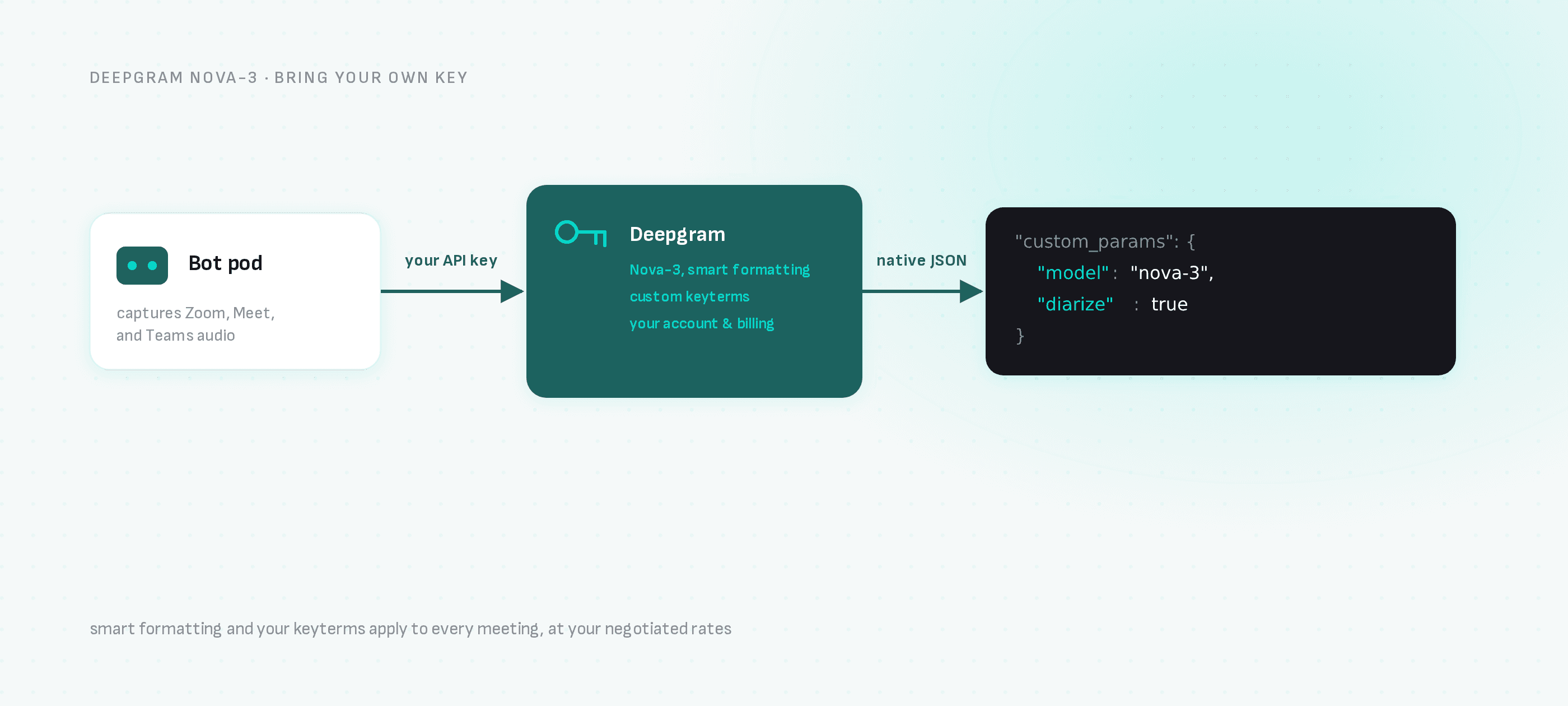
This guide wires a meeting bot to your Deepgram account: the bot records the meeting, Deepgram transcribes it, and your webhook receives Deepgram-native output.
One request: the bot joins Zoom, Google Meet or Microsoft Teams, and transcription_config routes the audio to Deepgram under your API key.
Step 1: Get your keys
- Deepgram: create an API key in the Deepgram Console (the same key you'd put in
DEEPGRAM_API_KEY). - Meeting BaaS: self-serve signup at dashboard.meetingbaas.com — your first 8 recording hours are free.
Step 2: Send a bot with Deepgram configured
curl -X POST "https://api.meetingbaas.com/v2/bots" \
     -H "Content-Type: application/json" \
     -H "x-meeting-baas-api-key: $API_KEY" \
     -d '{
           "meeting_url": "https://meet.google.com/abc-defg-hij",
           "bot_name": "Deepgram Bot",
           "transcription_config": {
             "provider": "deepgram",
             "api_key": "'"$DEEPGRAM_API_KEY"'",
             "custom_params": {
               "model": "nova-3",
               "smart_format": true,
               "diarize": true
             }
           }
         }'
custom_params passes options straight through to Deepgram, so the parameters you already use — model, smart_format, diarize, keyterm prompting — work unchanged. Without a model value Deepgram defaults to base, so set nova-3 explicitly.
Step 3: Receive Deepgram-native output
When the meeting ends, your webhook receives the transcription artifact mirroring Deepgram's response structure — transcript, per-word timing, confidence scores, punctuated_word values with smart formatting — plus the recording, participant list and speaker timeline in the standard Meeting BaaS format. Parsers you've already written for Deepgram keep working.
Why this combination
- Smart formatting: currency, phone numbers and emails formatted by Deepgram's
smart_format— useful for sales-call extraction. - Keyterms: product names and jargon recognition tuned in your Deepgram account applies to every meeting.
- Your billing: Deepgram usage runs on your own account and rates; Meeting BaaS bills 0.05 tokens per recorded hour for bring-your-own-key transcription on every plan, plus the standard 1 token per hour recording rate.
When to use the built-in option instead
If you don't have a Deepgram account, the built-in Gladia default (0.25 tokens/hour, 100+ languages, diarization included) needs zero provider setup. You can switch providers per bot, so mixing both in one product is fine.
Next steps
- Deepgram meeting transcription — the integration page
- All transcription providers — Gladia, AssemblyAI, Speechmatics, Soniox
- Real-time streaming — live transcripts instead of post-call
- API documentation