Capture Zoom, Google Meet and Microsoft Teams meetings and transcribe them with Soniox's multilingual, language-switching speech recognition — one bot request, Soniox-native output by webhook.
Some meetings don't stay in one language. A sales call that opens in English, drifts into Spanish for the technical detail and closes in English again defeats most transcription setups. Soniox is built for exactly this: 60+ languages with native-speaker accuracy on multilingual, language-switching and multi-speaker conversations.
What Soniox needs is the audio — and getting clean audio out of Zoom, Google Meet or Microsoft Teams is what a meeting bot does. This guide connects them.
If your users' meetings code-switch between languages mid-sentence, Soniox through a meeting bot is the strongest pipeline available for it.
Step 1: Get your keys
- Soniox: create an API key in the Soniox Console — it's also where usage and billing live.
- Meeting BaaS: self-serve signup at dashboard.meetingbaas.com — first 8 recording hours free.
Step 2: Send a bot with Soniox configured
curl -X POST "https://api.meetingbaas.com/v2/bots" \
     -H "Content-Type: application/json" \
     -H "x-meeting-baas-api-key: $API_KEY" \
     -d '{
           "meeting_url": "https://meet.google.com/abc-defg-hij",
           "bot_name": "Soniox Bot",
           "transcription_config": {
             "provider": "soniox",
             "api_key": "'"$SONIOX_API_KEY"'"
           }
         }'
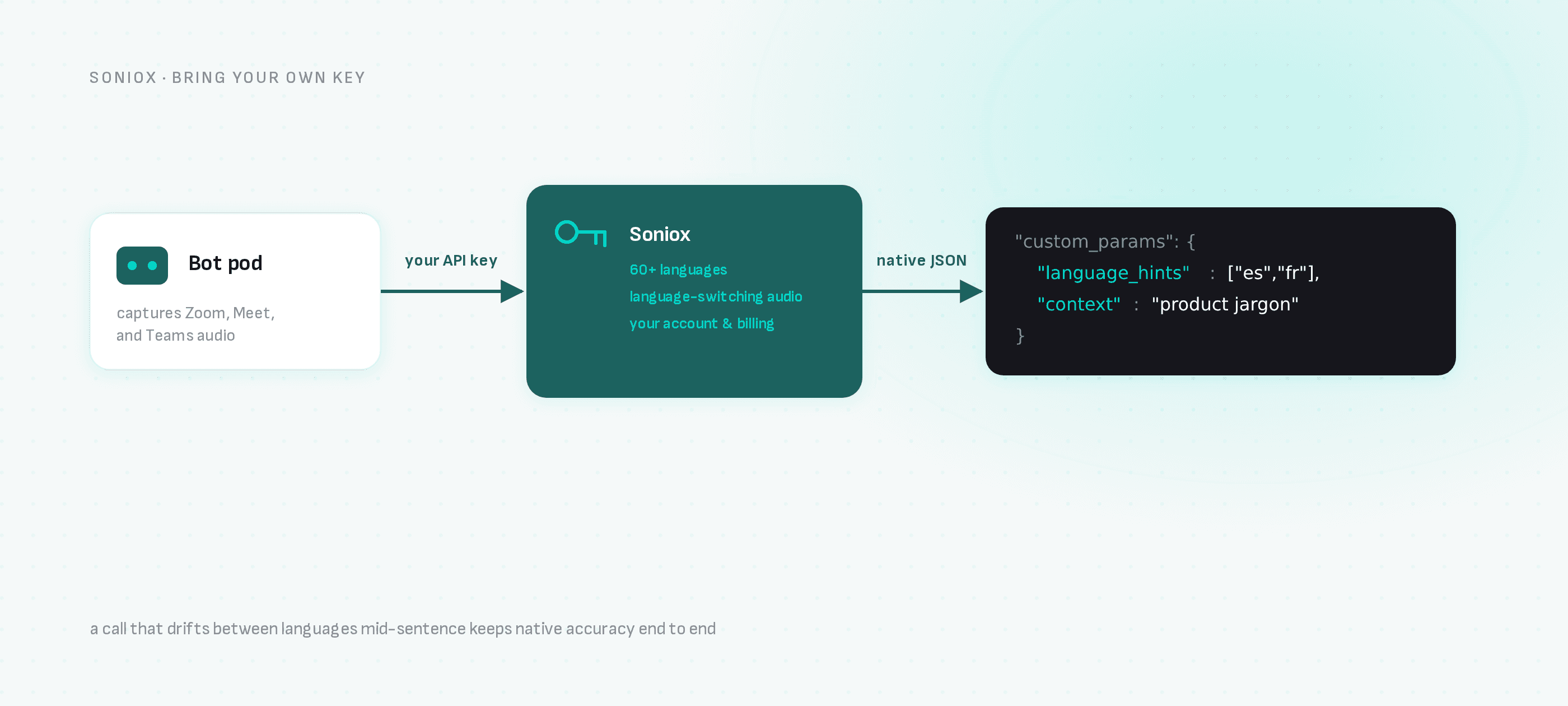
Soniox-specific options — language hints, context for domain vocabulary — pass through custom_params using Soniox's own parameter names, so anything from their async API surface is available without waiting for a wrapper.
Step 3: Receive Soniox-native output
Your webhook receives the transcription artifact mirroring Soniox's response structure — including its language handling across switches — plus the recording, participant list and the bot's speaker timeline in the standard Meeting BaaS format.
Why this combination
- Language switching: Soniox tracks mid-conversation language changes that single-language models garble.
- Multi-speaker accuracy: pair Soniox's multi-speaker handling with the bot's participant metadata to map voices to real attendee names.
- Your billing: Soniox usage runs on your console account; Meeting BaaS adds 0.05 tokens per recorded hour for bring-your-own-key transcription on every plan, plus the 1 token per hour recording rate.
Multilingual alternative without an account
The built-in Gladia default covers 100+ languages with automatic detection at 0.25 tokens per hour and needs no provider account — a good baseline before deciding whether your meetings need Soniox's code-switching strength.
Next steps
- Soniox meeting transcription — the integration page
- All transcription providers
- How the meeting bot works
- API documentation