在你自己的基础设施上部署 Meeting-BaaS,实现完整的数据控制与企业级安全性。每个 bot 的真实成本仅为 $0.066/小时,支持自动更新、零停机部署及全面的自定义能力。
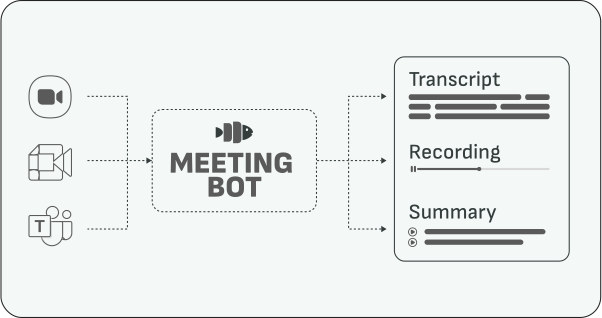
Meeting-BaaS On-Premises 快速入门
使用我们预构建的 Docker 镜像,你可以轻松运行自己的 Meeting BaaS 基础设施。本文将介绍这是如何实现的、你需要准备什么,以及最重要的——大致的成本。
你将获得对数据的完整控制权、全面的自定义能力,以及企业级安全性,同时保持与托管版本相同的 API 功能。
最重要的是,此部署方式让你能够以会议 bot 的真实价格($0.066/小时)付费,同时享有成熟商业产品的稳定性,并附带服务级别协议(SLA)。
在完整数据主权的保障下,构建 AI 会议助手、自动转写 workflow、实时音频流、会议分析、客户互动追踪、合规监控以及智能会议摘要。
定价评估
我们估计基础配置的总费用约为每月 $5,500,明细如下:
基础配置费用:
- 咨询费用: $10,000/月(包含部署、维护、支持及 SLA)
- 基础设施费用: $1,500/月(包含 8 个全天候运行的 bot)
示例:每月 20,000 小时
- 基础配置:$5,500/月(包含 1,408 小时——每天 8 小时 × 8 个 bot × 22 个工作日)
- 额外小时:18,592 小时 × $0.066 = $1,227
- 总计:$6,727/月($0.336/小时)
规模越大,成本效益越高:
- 每月 50,000 小时:约 $8,700/月($0.174/小时)
- 每月 100,000 小时:约 $12,100/月($0.121/小时)
前置要求
- Kubernetes cluster(1.20+)
- PostgreSQL 数据库
- Redis 实例
- S3 兼容的存储
- SQS 队列
- 已配置 kubectl
- Docker/container runtime
- 最低 16GB+ RAM、8+ vCPU
- 可访问会议平台的出站网络
工作原理
我们的 on-premise 部署采用企业级 CI/CD 自动化,使你的基础设施始终与我们的最新改进保持同步。
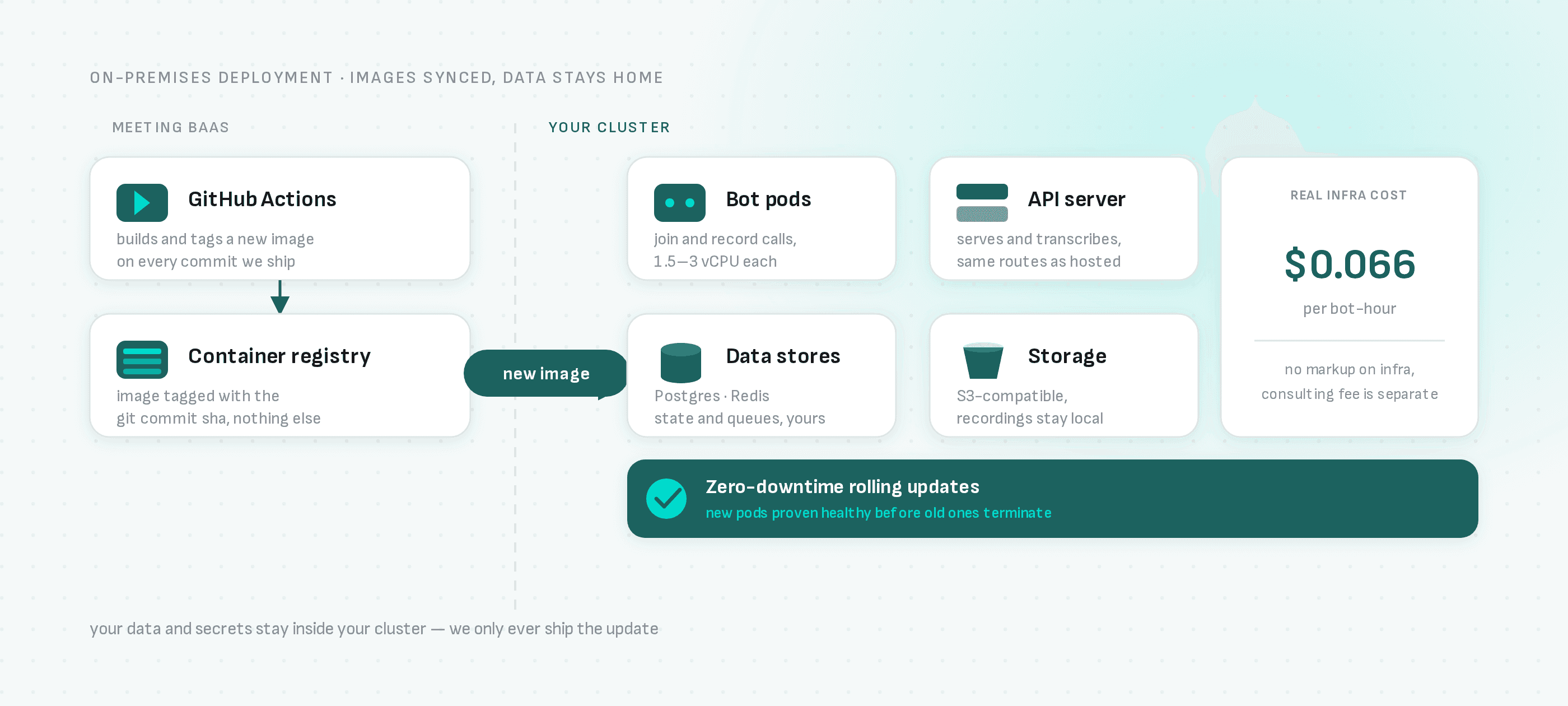
通过 CI/CD 构建镜像,按你的指令部署
工作方式:
- GitHub 集成: 我们的 CI/CD pipeline 在代码更新时自动构建并推送新的 Docker 镜像
- 由你控制发布: Kubernetes 不会自动监控 registry 并自动部署——registry 中的新镜像不会触及你的 cluster,除非你主动触发。运行
baas_controller.sh upgrade命令(或配置你自己的镜像监控工具,如 Flux 或 ArgoCD Image Updater,以实现自动化)来拉取新的 tag。
更新流程说明:
-
代码变更: 我们的 GitHub Actions workflow 自动构建新的 Docker 镜像,附带 git commit hash,并推送到我们的 Scaleway Container Registry
-
由你触发部署: 在你准备好时,针对新的镜像 tag 运行升级命令——除非你设置了自己的 registry 监控 controller,否则不会自动执行
-
零停机部署: 触发后,Kubernetes 逐个替换 pod,确保新 pod 健康后再终止旧 pod
核心优势:
- ✅ 由你决定时机: 按照自己的计划引入新功能、修复和安全补丁,而非被动跟随我们的节奏
- ✅ 零停机: 触发后无缝滚动更新,不中断服务
- ✅ 版本追踪: 通过 git commit hash 提供完整的审计记录
- ✅ 企业级可靠性: 与我们生产环境相同的 CI/CD pipeline
你拥有对基础设施的完整控制权,随时运行升级命令即可获取我们的最新改进。
快速部署
1. 克隆 Kubernetes 配置
git clone https://github.com/Meeting-BaaS/kubernetes-config.git
cd kubernetes-config
2. 安装 BaaS CLI
./baas_controller.sh install3. 配置环境变量
export ENVIRON=prod # or preprod for staging4. 部署服务
# Deploy bots (uses pre-built Docker images)
ENVIRON=prod ./baas_controller.sh bots install

# Check status
ENVIRON=prod ./baas_controller.sh bots status

# View logs
ENVIRON=prod ./baas_controller.sh bots log -f
核心命令
Bot 管理
# Install bots
ENVIRON=prod ./baas_controller.sh bots install

# Upgrade bots (zero downtime)
ENVIRON=prod ./baas_controller.sh bots upgrade

# Check status
ENVIRON=prod ./baas_controller.sh bots status

# View logs
ENVIRON=prod ./baas_controller.sh bots log -f

# Uninstall (causes downtime)
ENVIRON=prod ./baas_controller.sh bots uninstall
API 服务器管理
# Install API server
ENVIRON=prod ./baas_controller.sh api install

# Upgrade API server
ENVIRON=prod ./baas_controller.sh api upgrade

# Check status
ENVIRON=prod ./baas_controller.sh api status

# View logs
ENVIRON=prod ./baas_controller.sh api log -f
Cluster 管理
# Install cluster
ENVIRON=prod ./baas_controller.sh cluster install

# Access metrics
ENVIRON=prod ./baas_controller.sh cluster metrics
资源要求
每个 Bot Pod
- CPU:1.5 vCPU(requests)/ 3 vCPU(limits)
- 内存:3GB RAM(requests)/ 6GB RAM(limits)
- 存储:20GB 用于录像
基础设施最低配置
- 控制平面:2 vCPU、4GB RAM
- 工作节点:16 vCPU、32GB RAM(支持约 8 个 bot)
- 数据库:8 vCPU、32GB RAM(PostgreSQL)
- Cache:2 vCPU、4GB RAM(Redis)
环境变量
# Required
export ENVIRON=prod
export KUBECONFIG=/path/to/kubeconfig

# Optional
export SKIP_VALIDATION=1  # Skip confirmations
零停机更新
# Always use upgrade, never install for running services
ENVIRON=prod ./baas_controller.sh bots upgrade
ENVIRON=prod ./baas_controller.sh api upgrade
故障排查
# Check pod status
kubectl get pods -n services

# Describe pod issues
kubectl describe pod <pod-name> -n services

# Check persistent volumes
kubectl get pvc -n services

# Test connectivity
kubectl exec -it <pod-name> -n services -- curl -I https://meet.google.com
API 集成
# Set API endpoint
export MEETING_BAAS_API=https://your-domain.com/api
export API_KEY=your-api-key

# Test connection
curl -H "Authorization: Bearer $API_KEY" $MEETING_BAAS_API/version
存储配置
持久化存储卷
apiVersion: v1
kind: PersistentVolumeClaim
metadata:
  name: bot-storage
spec:
  accessModes:
    - ReadWriteOnce
  resources:
    requests:
      storage: 20Gi
  storageClassName: sbs-15k  # High IOPS
存储类
sbs-15k:高 IOPS,用于录像sbs-default:通用型scw-bssd:NVMe,适用于高性能场景
监控
# Access Grafana (if deployed)
ENVIRON=prod ./baas_controller.sh cluster metrics

# Check resource usage
kubectl top pods -n services
kubectl top nodes
扩展
# Scale bots horizontally
kubectl scale deployment meeting-bots --replicas=10 -n services

# Auto-scaling (HPA)
kubectl get hpa -n services
安全性
网络策略
apiVersion: networking.k8s.io/v1
kind: NetworkPolicy
metadata:
  name: bot-network-policy
spec:
  podSelector:
    matchLabels:
      app: meeting-bots
  policyTypes:
    - Ingress
    - Egress
  egress:
    - to:
        - namespaceSelector: {}
      ports:
        - protocol: TCP
          port: 443
RBAC
apiVersion: rbac.authorization.k8s.io/v1
kind: Role
metadata:
  namespace: services
  name: bot-role
rules:
  - apiGroups: [""]
    resources: ["pods", "services"]
    verbs: ["get", "list", "watch"]
备份与恢复
# Database backup
kubectl exec -it postgres-pod -n services -- pg_dump meeting_baas > backup.sql

# Restore database
kubectl exec -i postgres-pod -n services -- psql meeting_baas < backup.sql
清理
# Remove all services
ENVIRON=prod ./baas_controller.sh bots uninstall
ENVIRON=prod ./baas_controller.sh api uninstall

# Remove cluster (destructive)
ENVIRON=prod ./baas_controller.sh cluster uninstall