Use your own speech-to-text provider on Zoom, Google Meet and Microsoft Teams meetings: one bot API records the call, your provider transcribes it. Setup, code and pricing for every supported provider.
Speech-to-text providers are excellent at turning audio into text — and completely unable to get the audio out of a Zoom, Google Meet or Microsoft Teams call for you. If you've tuned a custom vocabulary on Deepgram or built your pipeline around AssemblyAI's audio intelligence, the missing piece is meeting capture, not transcription.
Meeting BaaS closes that gap: a bot records the meeting, and your provider transcribes it. One field in the request switches providers.
Supported providers: Gladia (built in, no account needed), Deepgram, AssemblyAI, Speechmatics and Soniox — plus ElevenLabs for real-time streaming transcription.
How it works
- Your backend creates a bot with a meeting URL and a
transcription_config - The bot joins the call like a participant and records it
- The audio is transcribed by the provider you selected — with your API key if you bring one
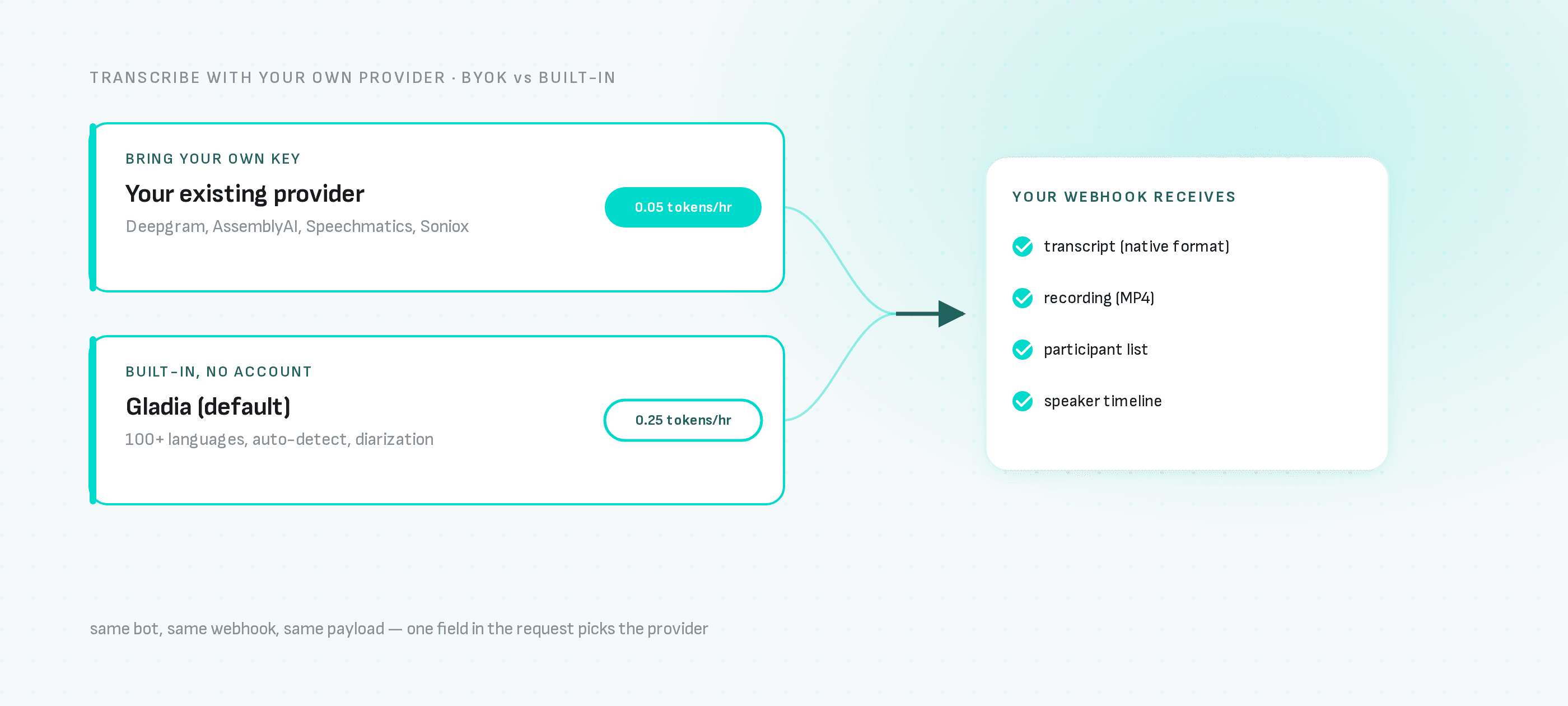
- Your webhook receives the transcript in the provider's native format, plus the recording, participant list and speaker timeline
Pick your provider in one field
curl -X POST "https://api.meetingbaas.com/v2/bots" \
     -H "Content-Type: application/json" \
     -H "x-meeting-baas-api-key: $API_KEY" \
     -d '{
           "meeting_url": "https://meet.google.com/abc-defg-hij",
           "bot_name": "Transcription Bot",
           "transcription_config": {
             "provider": "assemblyai",
             "api_key": "'"$ASSEMBLYAI_API_KEY"'"
           }
         }'
Swap "assemblyai" for "deepgram", "speechmatics" or "soniox" — nothing else changes. Provider-specific options (language hints, custom vocabulary, regional endpoints) pass through custom_params, and a region field covers providers with regional deployments.
Why bring your own key?
- Keep your provider relationship: negotiated rates, custom models and vocabulary tuning carry over untouched.
- Native output format: the raw transcription artifact mirrors your provider's response structure, so parsers and downstream tooling built for that provider keep working.
- Lower per-hour cost: BYOK transcription is 0.05 tokens per recorded hour on every plan, versus 0.25 tokens per hour for the built-in option.
Or skip the account entirely
The default is Gladia, built in with no provider account: 100+ languages, automatic language detection and speaker diarization at 0.25 tokens per hour. It's the fastest path from zero to transcripts.
Provider guides
- Gladia meeting transcription
- Deepgram meeting transcription
- AssemblyAI meeting transcription
- Speechmatics meeting transcription
- Soniox meeting transcription
- ElevenLabs streaming transcription
Step-by-step tutorials per provider
- Record meetings with Deepgram Nova-3
- Record meetings with AssemblyAI
- Record meetings with Speechmatics
- Record multilingual meetings with Soniox
- Live transcription with ElevenLabs Scribe v2 Realtime
What this costs
Recording is 1 token per hour ($0.35–0.50 depending on token pack size), speaker diarization included. Add 0.25 tokens per hour for built-in Gladia transcription, or 0.05 tokens per hour with your own key. Time the bot spends waiting to be admitted is billed as recording time.
Next steps
- Meeting transcription API overview
- Real-time transcription and audio streaming
- Meeting bot API — how the capture layer works
- API documentation